Ticket Escalation Standards and Process
Overview
This document outlines the required process and documentation standards for escalating tickets within the support team. The goal is to ensure escalations are actionable, reduce unnecessary back-and-forth, and allow senior technicians to focus on issues that require their expertise.
When to Escalate
Escalation should occur when:
Standard troubleshooting has been completed
The issue requires elevated access or deeper technical investigation
The root cause is unclear after reasonable effort
The issue exceeds your current scope or permissions
Escalation should not be used as a first step.
Pre-Escalation Requirements
Before escalating, the following must be completed:
1. Complete Ticket Documentation
The ticket must contain a clear and complete history, including:
A concise summary of the issue
All troubleshooting steps performed
Results of those troubleshooting steps
Any relevant user communication or observations
Note: The expectation is that another technician can review the ticket and immediately understand what has been done and what the current state is without needing additional clarification.
2. Review Recent Ticket History
Check the contact’s recent tickets (last 2 weeks) to determine:
If this is a recurring issue
What troubleshooting or resolutions were previously attempted
Note: Checking the contact or company's recent tickets for the preceding 14 days is important in determining whether the request falls within our service warranty window for a completed, recent service.
If the issue is recurring:
Reference prior ticket numbers in your escalation
Note any patterns or repeated failures
Adjust escalation context accordingly
3. Verify Ticket Configuration
Before escalation, confirm:
Ticket Category is accurate
Priority Level reflects actual business impact
Status remains Open (do not prematurely change status)
Ticket is assigned appropriately prior to escalation (if applicable)
Proper categorization ensures accurate routing, reporting, and prioritization.
Escalation Requirements
Before escalating a ticket, you must complete the Escalation Info Template by inserting the canned response into an internal, private note on the ticket. You can use the summary note for this requirement, if preferred as well.
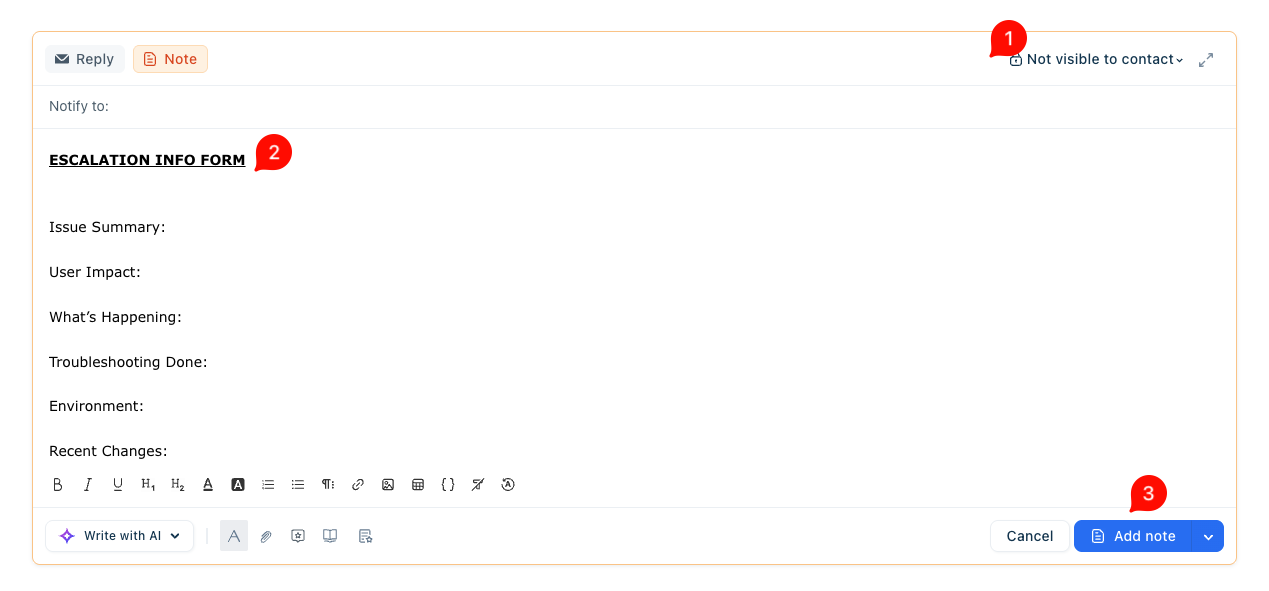
- Double-check visibility is restricted for contact.
- Complete form fields where applicable.
- Click add note to save it to the ticket.
Required Information:
Issue Summary
User Impact
What’s Happening
Troubleshooting Done
Environment
Recent Changes
Escalation Reason
This information must be complete and detailed enough that another technician can immediately continue troubleshooting without needing additional clarification.
Escalation Process
Follow these steps in order:
Insert the “Escalation Info Template” canned response into a private note on the ticket
Fully complete all sections of the template
Send a response to the customer acknowledging the issue and setting initial expectations
Leave the ticket status as Open (do not change status)
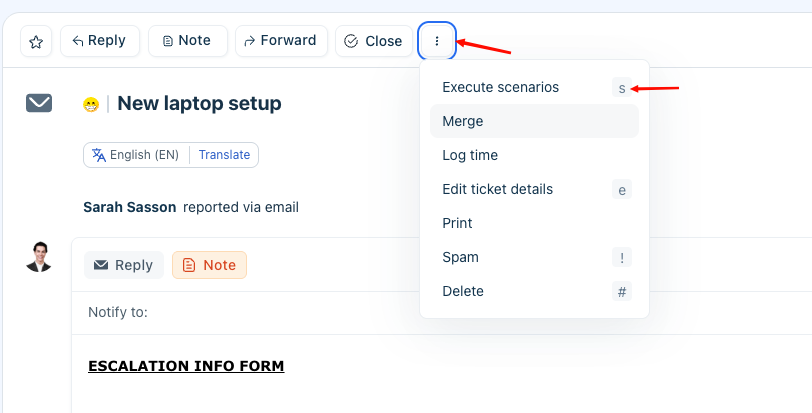
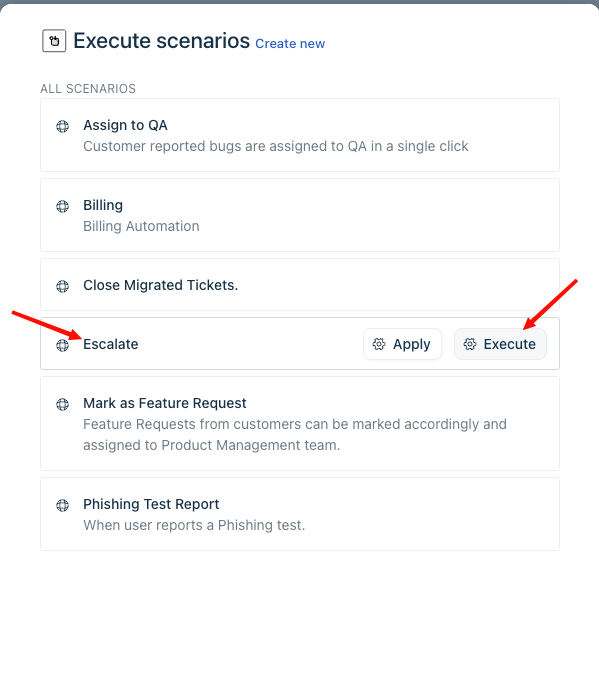
Run the “Escalate” Scenario Automation
Important Notes
Escalations submitted without the required template information will be sent back for completion
Incomplete or vague escalations delay resolution and increase internal workload
Teams messages should not be used in place of proper ticket escalation
All escalation context must be documented within the ticket
Was this article helpful?
That’s Great!
Thank you for your feedback
Sorry! We couldn't be helpful
Thank you for your feedback
Feedback sent
We appreciate your effort and will try to fix the article